
网上购物 货比三家
您现在的位置:快乐比价网 > 图书 > 计算机与网络 > 计算机/网络 > 商品详情

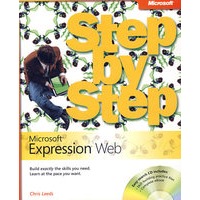
Microsoft Expression Web 进阶手册(光盘)Microsoft Expression Web Step by Step

分享到:
Microsoft Expression Web 进阶手册(光盘)Microsoft Expression Web Step by Step

最 低 价:¥97.00

定 价:¥210.00

作 者:ChrisLeeds 著

出 版 社:Oversea Publishing House

出版时间:2007-12-1

I S B N:9780735624405

商品详情

编辑推荐

内容简介

The smart way to learn Microsoft Expression Web one step at a time! Work at your own pace through the easy numbered steps, practice files on CD, hands-on exercises, and master the fundamentals of creating effective Web sites. You ll work with advanced design technologies and discover the powerful and easy-to-use Web design experience that Expression Web delivers. You'll learn how to create professional-looking Web pages, work with powerful design tools and task panes, and incorporate support for XML, Microsoft ASP.NET, Extensible HTML (XHTML), and Web pages built using Microsoft Office FrontPage®. You ll also learn how to build templates, work with sophisticated cascading style sheets and other design features that help you to precisely control your work, and take advantage of built-in support for today s Web standards. With STEP BY STEP, you can take just the lessons you need or work from cover to cover. Either way, you drive the instruction, building and practicing the skills you need, just when you need them! Includes an easy-search companion CD with files for practicing the book s lessons, a complete eBook, and more!
  Covers the fundamentals for building dynamic, interactive pages that meet today s Web standards
  Features easy-to-follow lessons and hands-on skill-building exercises
  Includes an easy-search companion CD with practice files, a complete eBook, and other resources

  作者简介:
  Chris Leeds is a long-time digital photographer and Web enthusiast who has been a Microsoft Most Valuable Professional for Office FrontPage for more than three years. He is also a Microsoft FrontPage Registered Web Presence Developer and a member of both the HTML Writer s Guild and International Webmaster s Association and developed a software product that users can use to easily create sites that can be edited and managed with just a browser. Chris was the technical editor for FrontPage 2003 (The Missing Manual) and has also developed several tutorials on FrontPage. He has delivered presentations on how to use FrontPage at various colleges, written articles for various online publications, and contributed extensively to newsgroups dedicated to FrontPage.

作者简介

目录

Contents
Introducing Expression Web
 Upgrading from FrontPage
Information for Readers Running Windows XP
 Managing the Practice Files
 Using the Start Menu
 Navigating Dialog Boxes
Features and Conventions of This Book
Using the Book's CD
 What's on the CD?
 Minimum System Requirements
Step-by-Step Exercises
 Installing the Practice Files
 Using the Practice Files
 Removing the Practice Files
Getting Help
 Getting Help with This Book and Its CD
 Getting Help with Microsoft Expression Web
1 Understanding How Expression Web Works
 Exploring and Customizing the User Interface
 Opening an Existing Site
 Displaying Different Views of a Site
 Exploring an Individual Web Page
 Understanding Basic Expression Web Concepts
 Key Points
2 Moving from FrontPage to Expression Web
 Understanding the Differences Between Expression Web and FrontPage
 Publishing a Backup Copy of a Site
 Managing FrontPage Sites by Using Expression Web
  Changing Shared Border Content
  Adding a Page
 Using FrontPage Code in an Expression Web Site
 Converting FrontPage Sites to Expression Web
 Key Points
3 Becoming Familiar with Modern Web Site Standards
 Verifying and Addressing W3C Validity
 Verifying and Addressing Accessibility
 Using Cascading Style Sheets
 Choosing and Using the Right DOCTYPE
 Verifying and Improving Cross-Browser Rendering
 Key Points
4 Presenting Information on a Web Page
 Using Tables for Layout: Right or Wrong?
 Using Lists to Group Information
 Using Semantic Markup
 Styling the Presentation of Your Content
  Sidebar: Cascading Style Sheets
 Key Points
5 Enhancing a Web Site with Images
 Adding Images to a Web Page
 Editing Images in Expression Web
 Using Images with a Style Sheet
 Using Images as Backgrounds
 Using Images as Bullets
 Using Images as Hyperlink Backgrounds
 Key Points
6 Creating a Web Site from a Template
7 Creating a Web Site from Scratch
8 Taking It to the Next Level
9 Publishing a Web Site
10 Managing a Web Site
11 Using ASP.NET Features
Glossary
Index
About the Author

商品评论(0条)

暂无评论!

您的浏览历史

loading 内容加载中,请稍后...